Legal Help Task Taxonomy
A structured taxonomy of 50+ legal help tasks across 7 workflow categories that maps where AI can help people get civil legal help and providers serve them. It's the organizing backbone of JusticeBench and a shared vocabulary for scoping, comparing, and cataloging legal AI projects.
Description
Creator: Margaret Hagan / Stanford Legal Design Lab
Type: Taxonomy / Classification Framework
Format: CSV (also available as browsable web pages on JusticeBench and as structured records in Airtable)
License: Open (CC-BY-4.0 recommended; confirm)
Live browsable version: https://www.justicebench.org/task
First published: December 2025 (JURIX Conference, Turin)
Current version: 50 tasks, 7 categories
What It Is
The Legal Help Task Taxonomy is a structured classification of the specific tasks where AI can improve access to justice. It breaks the problem down from "AI for legal help" (too broad to act on) into 50 concrete, scoped tasks organized by where they sit in the justice workflow.
The taxonomy is built around two user journeys. The first is the person's justice journey: someone facing eviction, debt, divorce, or another legal problem moves through stages from awareness to orientation to strategy to work product to engagement to presentation to follow-through. The second is the service provider's workflow: legal aid groups, court self-help centers, and other organizations conduct outreach, screen and triage, provide tailored advice, produce work product, coach clients, and manage operations.
Each task in the taxonomy represents a specific, bounded piece of work that AI could assist with. Tasks are general across problem types and geographies so that teams working on different legal issues in different jurisdictions can find common ground and collaborate on shared technical solutions.
The 7 Categories
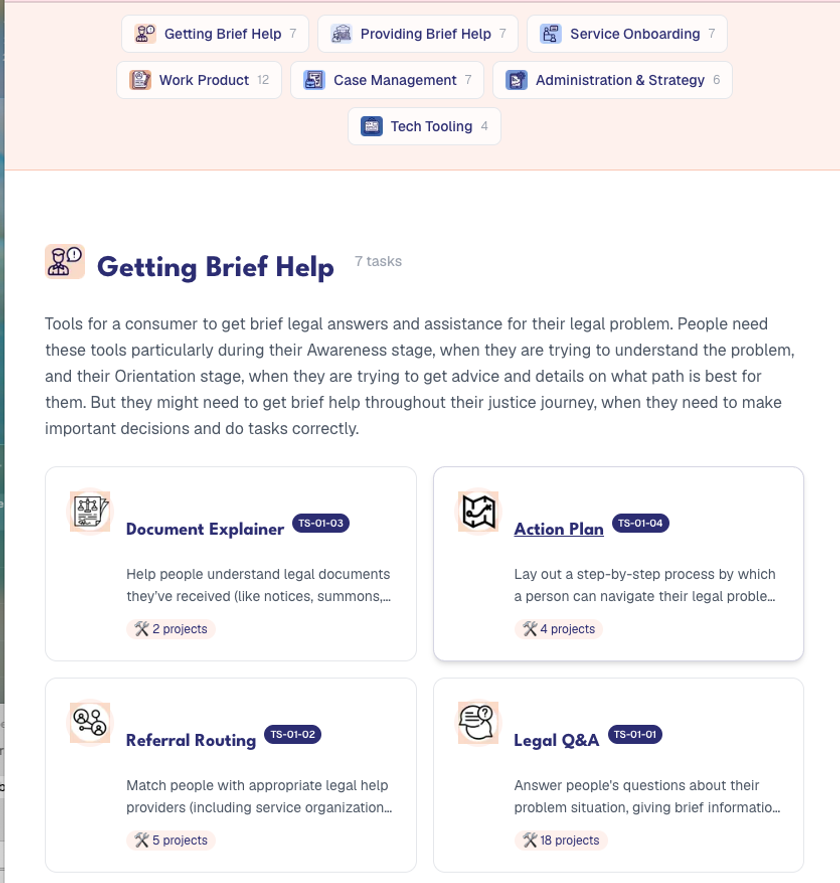
Getting Brief Help (TS-01, 7 tasks). Tools for a person to get brief legal answers and assistance. Includes Legal Q&A, Referral Routing, Document Explainer, Action Plan, Deadline Calculator, Form Selection, and Issue-Spotting.
Providing Brief Help (TS-02, 7 tasks). Tools for service providers to create and deliver quality brief help to the public. Includes Q+A Supporter, Guide Writer, Media Creator, Content Reviewer, Law Watcher, Help Translator, and Law Summarization.
Service Onboarding (TS-03, 7 tasks). Tools to intake, screen, triage, and prepare a person to receive legal assistance. Includes Intake Interviewer, Document Issue-Spotter, Data Researcher, Legal Analyzer, Conflicts Checker, Eligibility Verification, and Payments.
Work Product and Presentation (TS-04, 12 tasks). Tools to create legal documents, do research, draft narratives, file documents, and negotiate. The largest category. Includes Standard Document Filler, Expert Document Drafter, Narrative Drafter, Contract Reviewer, Document Draft Checker, Electronic Filer, Negotiation Helper, Legal Researcher, Service of Documents, Signatures, Evidence Preparation, and Outcome Prediction.
Case Management (TS-05, 7 tasks). Tools supporting ongoing case tracking, scheduling, procedure management, and court workflows. Includes Support Coach, Smart Scheduling, Procedure Triage, Filing Screener, Service Verification, Transcribe Proceedings, and Appointment Booking.
Administration, Ops, and Strategy (TS-06, 6 tasks). Tools for organizational operations, reporting, knowledge management, and pattern detection. Includes Data Extractor, Grant Reporter, Knowledge Management, Service Directory Maintenance, Trends Spotter, and PII Masker.
Tech Tooling (TS-07, 4 tasks). Tools for building and maintaining legal help technology. Includes Form Creator, Site Administrator, Interview Creator, and User Tester.
How It's Structured
Each task record contains five fields: Task Name, Task Code (hierarchical: TS-[category]-[number]), Process Step it relates to (the parent category), Brief Description (~90 characters), and Full Description (500–4,600 characters explaining the task, who needs it, what good performance looks like, and where AI fits).
Task codes follow a consistent pattern: TS-01-01 through TS-07-04. The first two digits identify the category, the second two identify the task within that category.
How It Was Built
The taxonomy emerged from community brainstorms, workflow mapping sessions, practitioner interviews, and iterative refinement with legal aid organizations, court self-help centers, and technologists in the AI and Access to Justice network (1,300+ members). It was first presented at the JURIX 2025 conference in Turin as part of a research paper on AI task taxonomies for access to justice.
How to Use It
Project scoping. When a legal aid organization starts an AI project, the taxonomy helps them identify which specific task they're trying to automate or augment: not "build a chatbot" but "build a TS-01-01 Legal Q&A tool scoped to housing in San Diego County."
Cataloging and comparison. JusticeBench uses the taxonomy to tag every project in the catalog. This lets users find all projects working on the same task (e.g., all Intake Interviewer projects) regardless of jurisdiction or organization.
Evaluation design. Each task implies different quality standards, risk profiles, and evaluation criteria. A Deadline Calculator (TS-01-05) needs exact date arithmetic. A Narrative Drafter (TS-04-03) needs empathetic, legally grounded prose. The taxonomy helps evaluation designers scope their rubrics to the right task.
Gap analysis. Looking across the catalog, you can see which tasks have many projects (Legal Q&A has 18) and which have none. This highlights where the field is concentrated and where opportunities exist.
Grant writing and reporting. The taxonomy provides shared language for funders and grantees to describe what a project does in specific, comparable terms.
Known Limitations
The taxonomy is intentionally general: it abstracts across legal issue areas, jurisdictions, and organizational types. This makes it useful for cross-cutting comparison but less useful for jurisdiction-specific workflow mapping.
Some tasks overlap. A Document Issue-Spotter (TS-03-02) and an Issue-Spotting tool (TS-01-07) both identify legal issues but for different users and at different workflow stages. The distinction matters in practice but can confuse newcomers.
The taxonomy will evolve. New task types may emerge as AI capabilities change (e.g., agentic workflows that chain multiple tasks). Existing tasks may split or merge as the field learns what granularity is useful.
Download and Contribute
The CSV is available for download from JusticeBench. The browsable version at https://www.justicebench.org/task includes linked project counts for each task. Feedback on missing tasks, better descriptions, or structural improvements is welcome via the JusticeBench feedback form.