LIST taxonomy of legal issues
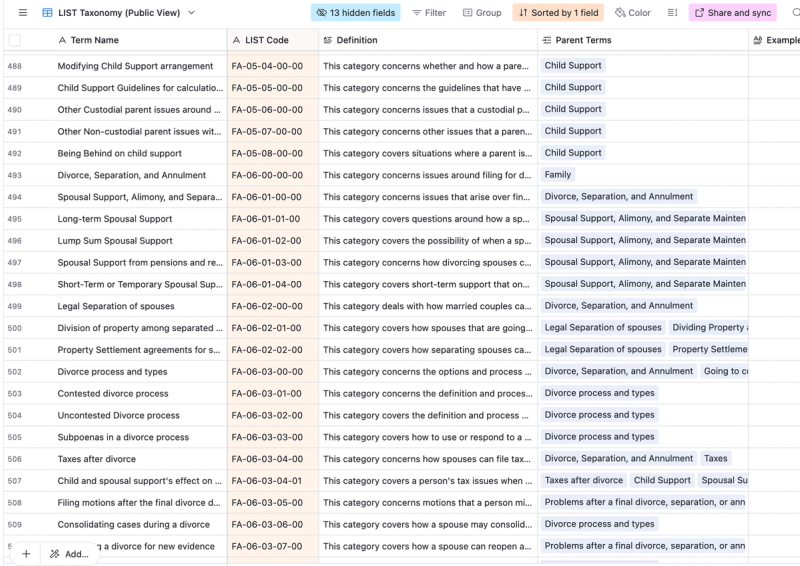
A maintained taxonomy of 1,100+ legal issues (life-problem scenarios), maintained by Stanford Legal Design Lab. Each legal issue has a stable ID code, parent/child relations, and plain-language explanations, designed to standardize labeling and retrieval across civic and legal tech.
Description
The Legal Issues Taxonomy (LIST) is a structured vocabulary of legal problems that people commonly encounter, curated and maintained by the Stanford Legal Design Lab. Each entry has a unique, stable code, a canonical label, parent/child relationships, and plain-language descriptions with concrete examples. LIST’s scope spans everyday civil legal needs (e.g., housing, family, debt, employment, benefits), along with cross-issue entries that reflect how people describe problems in non-legal terms. The current release includes ~1,115 terms, giving practitioners and researchers a consistent “problem space” to anchor products, datasets, and evaluations.
LIST for standard labels
For AI R&D, LIST functions as a ground-truth spine for data normalization and evaluation. Teams use LIST codes to: (1) tag corpora and Q&A pairs so models learn and are scored against a consistent notion of “issue type”; (2) drive retrieval faceting in RAG systems (filter/search by LIST code paths instead of brittle keywords); and (3) structure prompts, tool routing, and workflow selection (e.g., map an extracted LIST code to a specific form-filling or letter-drafting agent). Because entries include definitions and examples—not just labels—LIST supports both machine and human annotators in making consistent, auditable choices.
LIST to bridge internal, fragmented systems
LIST also bridges taxonomies. Where feasible, entries map to other legal dictionaries and problem-code systems (e.g., court or legal-aid issue lists), enabling crosswalks between local datasets and national resources. This makes LIST useful for multi-jurisdiction deployments: a navigator or copilot can standardize on LIST internally while still exporting or reporting in a partner’s native codes. The hierarchical structure (parent → child → leaf) supports varying levels of granularity, so you can train/evaluate at coarse or fine levels without breaking comparability.
How can LIST be used in AI development?
Common AI uses include: labeling historical chat or intake transcripts; aligning synthetic data generation to real issue distributions; building benchmark suites by issue (e.g., “Housing: Repairs,” “Debt: Post-judgment”), and enforcing guardrails that keep models “on-book” (e.g., if the predicted LIST code is out of scope, trigger refusal or handoff). For RAG, LIST code paths can become embeddings or metadata keys that improve retrieval precision, language parity checks, and analytics (e.g., outcome metrics by issue family).
Data Dictionary of LIST spreadsheet
Below are the fields visible in the Airtable/csv version of the LIST taxonomy, with each field's intent, data type, examples, and recommended AI uses.
1) Term Name
- Type: string (canonical label)
- Example: “Medicaid coverage of nursing home care”
- Semantics: The human-readable, canonical name of the issue.
- AI uses: Display text; surface in UI facets and prompt scaffolds; fallback label when code is hidden.
2) LIST Code
- Type: string (stable ID; hierarchical code)
- Example:
BE-03-02-03-00 - Semantics: A stable identifier encoding the term’s position in a hierarchy. Pattern is UPPER-alpha prefix + hyphen-delimited numeric segments. In the screenshot,
BEaligns with the Public Benefits domain (see Top Parent), followed by numeric path segments that narrow to specific benefit topics and procedures. - Constraints: Unique; do not recycle; treat as the authoritative join key across systems.
- AI uses:
- Annotation: tag Q&A pairs, documents, forms, and chat turns with LIST codes to create consistent training/eval sets.
- RAG metadata: store codes and full paths as filters for precise retrieval (e.g.,
top_parent=Public Benefits,path=BE>03>02>03>00). - Routing: map codes to downstream tools/workflows (e.g., if
BE-03-02*→ show “Appeals” guidance or form-filler).
3) Definition
- Type: string (plain-language description)
- Example (pattern): “This category covers situations where … (who, what, when)”
- Semantics: Concise, non-technical explanation of what belongs in the category (and implicitly what does not).
- AI uses:
- Guardrails & evaluation: turn definitions into inclusion/exclusion checks in prompts; use as short “gold” descriptions when scoring classification.
- UX clarity: show on hover to help annotators choose consistently.
4) Parent Terms
- Type: array of strings (one or more parent labels)
- Example: “Medicaid health coverage”; “Administrative agencies” (a term may have multiple parents)
- Semantics: The immediate parent(s) in the hierarchy; expresses poly-hierarchy (a child can live under more than one conceptual parent).
- AI uses:
- Hierarchical classification: predict at coarse level first (Top Parent), then refine down parent chains.
- Backoff & smoothing: when leaf confidence is low, back off to a parent code to keep labels useful.
- Navigation facets: support “browse by parent” UIs.
5) Example Prompt
- Type: string (short scenario or user-phrased query)
- Example (pattern): “Suing to enforce …”; “Application process for Medicare …”
- Semantics: A concrete seed prompt that typifies the user problem in natural language, suitable for LLM prompting and for human annotators as an example.
- AI uses:
- Training/eval seeds: generate realistic synthetic queries; build prompt sets for benchmark suites.
- Inference prompting: include as few-shot exemplars when nudging models to assign LIST codes.
6) Mapped to other …
- Type: array of strings or structured mapping objects (external system + code)
- Example: “NSMI v1 Taxonomy [1511700]” (and similar)
- Semantics: Crosswalks to external taxonomies (e.g., NSMI), enabling interoperability with partner datasets or legacy codes.
- AI uses:
- Normalization: import/export with courts, helplines, or research corpora that rely on other code systems.
- Benchmark blending: align third-party labeled sets to LIST for unified model evaluation.
- RAG federation: query multiple knowledge sources with different native codes by converting to/from LIST.
7) Top Parent
- Type: string (top-level domain / root label)
- Example: “Public Benefits”
- Semantics: The highest-level category for the term; provides the first facet in the hierarchy and a quick “domain” for routing.
- AI uses:
- Coarse classification: first-stage prediction and guardrail (e.g., refuse outputs outside approved top parents).
- Analytics: roll-up metrics by domain (volume, accuracy, actionability).
Possible ways to use LIST in AI work
- Annotation spine for datasets.
Tag each example (document, Q&A, chat turn) withlist_codeand optionally withtop_parentandpath. This enables reproducible splits and cross-project comparability. - RAG metadata & filters.
Save LIST codes alongside embeddings. At query time, filter by domain or exact code path (e.g., only retrieveBE-*when the classifier predicts Public Benefits). - Hierarchical classification.
Train a two-stage (coarse→fine) or hierarchical classifier. Use parent fallback to avoid brittle leaf predictions; it’s often better to be coarsely correct than finely wrong. - Benchmark construction.
Build per-issue benchmark packs: for each LIST leaf (or parent), include: (a) 5–20 Example Prompts, (b) short gold answers or gold elements required, (c) pass criteria (actionability, legal fidelity, deadlines, language parity). - Routing & workflow selection.
Maplist_codeto product behaviors (e.g., show the “Appeals” toolset for…-Appealing Medicaid decisions). This is a simple lookup table keyed on LIST.
Where to find the terms & taxonomy
Look up the full interactive Taxonomy website at taxonomy.legal
Or get the up-to-date Airtable of all terms, examples and more here at this link.